
 kaylee.stec
I have implemented the first version of Grouping in EDOnline
This version you can select multiple frames and group them. Then if you go back, you can see it automatically selects all the frames in the group. To group frames, simply select multiple frames and right click and you will see an option to "Group Frames"
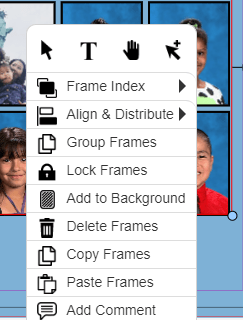
Simply click that and you will have defined a group. Now if you deselect the group, then selecting any one frame in the group with automatically cause the designer to select all the frames in the group.
A few issues I’ve seen:
– Clearly can’t resize or rotate the group – but you can apply borders, colors, drop shadows, etc
– If you group more than 10 frames, then it slows down a bit so you’ll see a popup with spinner that says "Selecting XX frames in Group" . I’ve clocked this at about 2 seconds to select a group of about 25 frames.
You can test the feature in angel edo. If you like it, let’s plan to deploy tomorrow!
Best,
elias
Elias K. Jo
Entourage Yearbooks
39 Everett Drive
Princeton Junction, NJ 08550
Tel: 888-926-6571
Fax: 800-395-9120
http://www.EntourageYearbooks.com
Remember Everything…

Pretty cool!